
Release Notes 2023/16
20.09.2023
Enhancements
Track and Trace
Deliveries
- The selection of the period for the CSV download has been made clearer
- This time period can be selected via a calendar picker
- See here
- This time period can be selected via a calendar picker
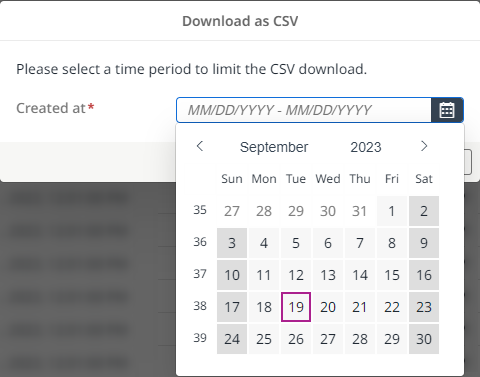
Selection of the time period for the CSV download
The time period for a CSV download must not exceed 14 days.
Deliveries
- The status "Overdue" is now only displayed for waypoints that have not been completed
Freight Orders
- The selection of the period for the CSV download has been made clearer
- This time period can be selected via a calendar picker
- See here
- This time period can be selected via a calendar picker
Selection of the time period for the CSV download
The time period for a CSV download must not exceed 14 days.
Tracking Settings
- The number of archived deliveries was limited to a maximum of 60
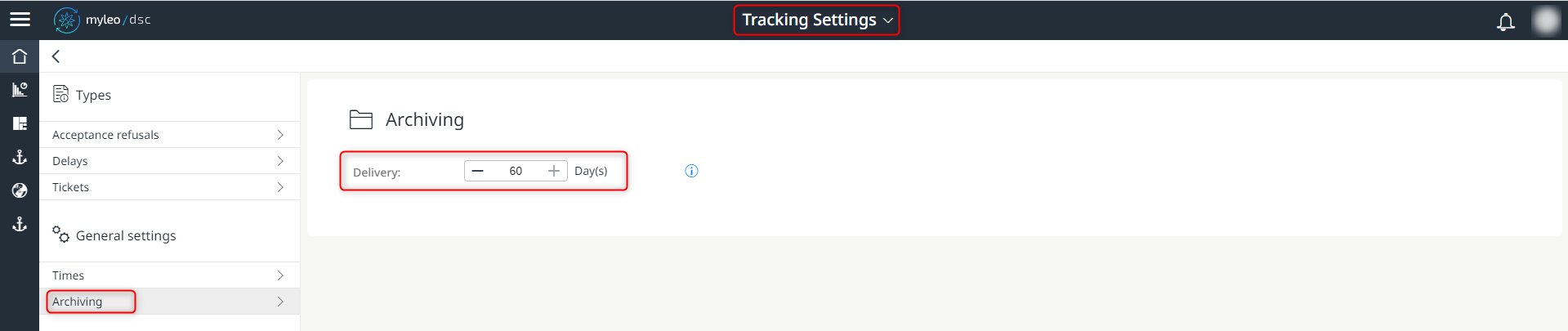
Determine the number of archived deliveries
This simplifies the search for an archived delivery.
Slot Booking
Slot Settings
- There are two more choices to set a strategy for time slot bookings:
- Day of the scheduled delivery
- Preferred timeframe (Slot)
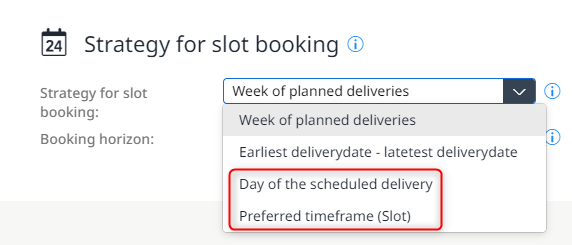
Two more choices
This extension of the time slot booking strategy allows bookings to be made either on the scheduled day only or within a preferred timeframe.
Slot Settings
- The new fields Loading meter and Cargo space can be used in Blockly with immediately
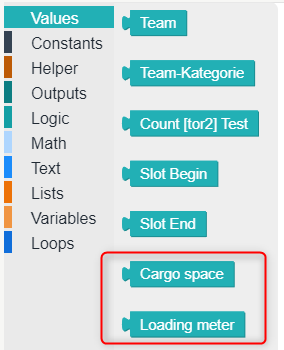
New selection options "Cargo space" and "Loading meter"
Empties Management
Order overview
- A pre-planning is now also cancelled after cancelling a freight order
- Booking of the pre-planning is therefore no longer possible
Order overview
- For deliveries that are bordero or encounter traffic, the data from the freight order is now used to prevent incorrect bookings during pre-planning
The aim is to obtain 2 pre-plannings in bordero and encounter traffic, which are accounted for separately and can be viewed in the system.
Dispute Management
Dispute Management
- The selection of the period for the CSV download has been made clearer
- This time period can be selected via a calendar picker
- See here
- This time period can be selected via a calendar picker
Selection of the time period for the CSV download
The time period for a CSV download must not exceed 14 days.
Bugfixes
Track and Trace
Deliveries
- Completed tickets assigned to a specific team are now no longer displayed if the status "Open" or "In progressing" has been selected
Deliveries
- The incorrect filtering according to a certain date was fixed
Freight Orders
- An error with the multiple creation of tickets was fixed
- An incorrect message has been removed
Freight Orders
- Completed tickets assigned to a specific team are now no longer displayed if the status "Open" or "In progressing" has been selected
Telematic Providers
- The incorrect display of the mandatory fields when editing the access data has been fixed
- The input fields are displayed with a red border
- The maximum number of possible characters within the input fields has been limited
- The incorrect display of the filtering according to an identifier within the tab "Resources" has been corrected
Slot Booking
Booking Calendar
- A time slot from 06:00 am can now also be selected for a booking by means of the external booking link
Empties Management
Coordinations
- The layout of the column headings within a generated pdf file has been improved
Dispute Management
Dispute Management
- Changes to the "In Clarification" freight charges are now displayed again
Updated over 1 year ago
What’s Next
Did this page help you?