
How can I select a day or time period in the calendar picker?
How can you select a day date or time period in the calendar picker?
In the Deliveries APP, Freight Orders APP and Dispute Management APP, the day date or a time period can be selected using the calendar picker.
Selection within Deliveries APP and Freight Orders APP
After selecting the Download button, the window for selecting the time period for which a CSV download is to be generated opens.

Download button in the Deliveries APP and Freight Orders APP
Selection within the Dispute Management APP
In the Dispute Management APP there is a download button:

Download-Button
with these options for the CSV-Download:
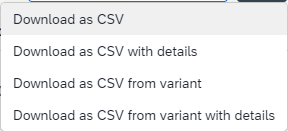
Options for the CSV-Download
Selection of the time period for the CSV download
A time limit of a maximum of 14 days is necessary for the CSV download. This time period can be selected via the calendar picker:
After selecting a download option, the following window opens:
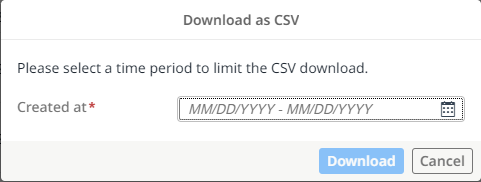
Download as CSV
Here you have two possibilities:
- Calculation time should be exactly 1 day
- Calculation time should be more than 1 day - i.e. a period of time
This is how you do it:
- Just click on the calendar icon on the far right.
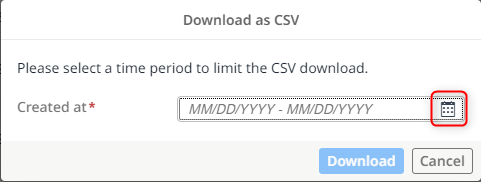
Open the calendar picker
The calendar picker then opens.
If you only want to select one day, search for the day and double-click it.
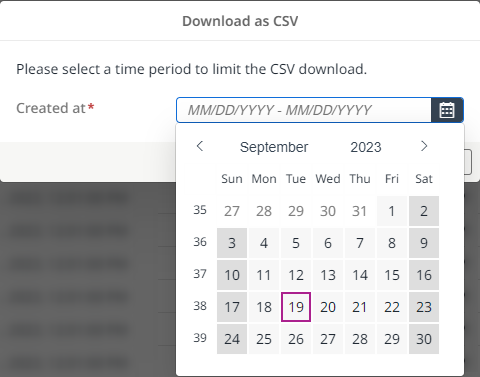
Selecting a specific day
- If you want to select a time period, search for the start date of the time period and click on the day once
- Select the end date by clicking on it (maximum = start date + 14 days) and you have set the time period.
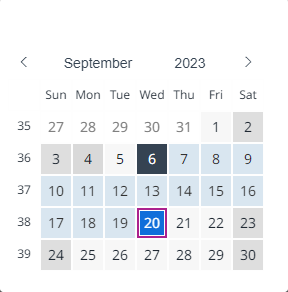
Selecting a time period
Start CSV download
As soon as the day or time period you have selected is displayed at Created at field and the field is outlined in green, you can start.
The download button is set to active and you can start the CSV download.
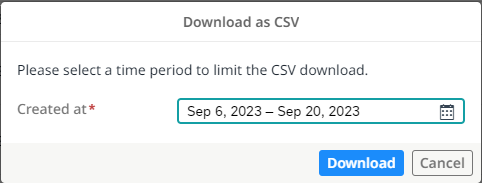
Active download button
Updated over 1 year ago